Introduction
At some point, I got access to GLM-4.7 and far more spare tokens than I could use in my day-to-day work. I had already delegated documentation, Git chores and graph building for navigating large projects to agents, so I started looking for less obvious ways to use models. Some of those experiments later became regular tools in my workflow. One of them was a pair of skills for log analysis.
Initially, I wanted to solve a fairly practical problem: give an agent a large log and get a clear account of what happened in the project, rather than a retelling of individual errors.
“Analyze this log” sounds specific until you encounter your first genuinely large file. At that point, the agent has to reduce the data to something it can process. It usually starts with grep for ERROR, WARNING, exception and a few obvious keywords. That is a rational strategy, but it has an unpleasant property: the method used to select lines quietly becomes the method of analysis.
In my projects, a log is not an appendix to the code or a place to look only after a crash. It is the actual history of the system’s life: what it received, which decisions it made, what it filtered out, where it slowed down, and which errors it recovered from. A detailed report does not necessarily mean a detailed analysis.
An isolated ERROR line proves very little, either. A subsequent retry may have handled the error normally. Meanwhile, a real problem can occur without any ERROR: a component no longer starts, a metric gradually worsens, or part of the pipeline simply disappears from the logs.
I ended up splitting the analysis into two skills with different approaches:
- Log Validate checks the log against known expectations extracted from the code.
- Log Insight tries to understand the system’s behavior from the sequence of events itself — including problems no one had defined in advance.
Log Validate
The first idea is straightforward: before looking for anything in a log, understand what the project is capable of logging.
Log Validate first reads the documentation, AGENTS.md or CLAUDE.md, and the source code to understand the project as a whole. It then finds logger calls and builds a signature map: module, level, message template, variables and the meaning of the event. The static parts of messages become precise grep patterns. The skill then checks which events anticipated by the code actually appeared in the log.
This produces a deductive process:
code → expected signals → log search → coverage check
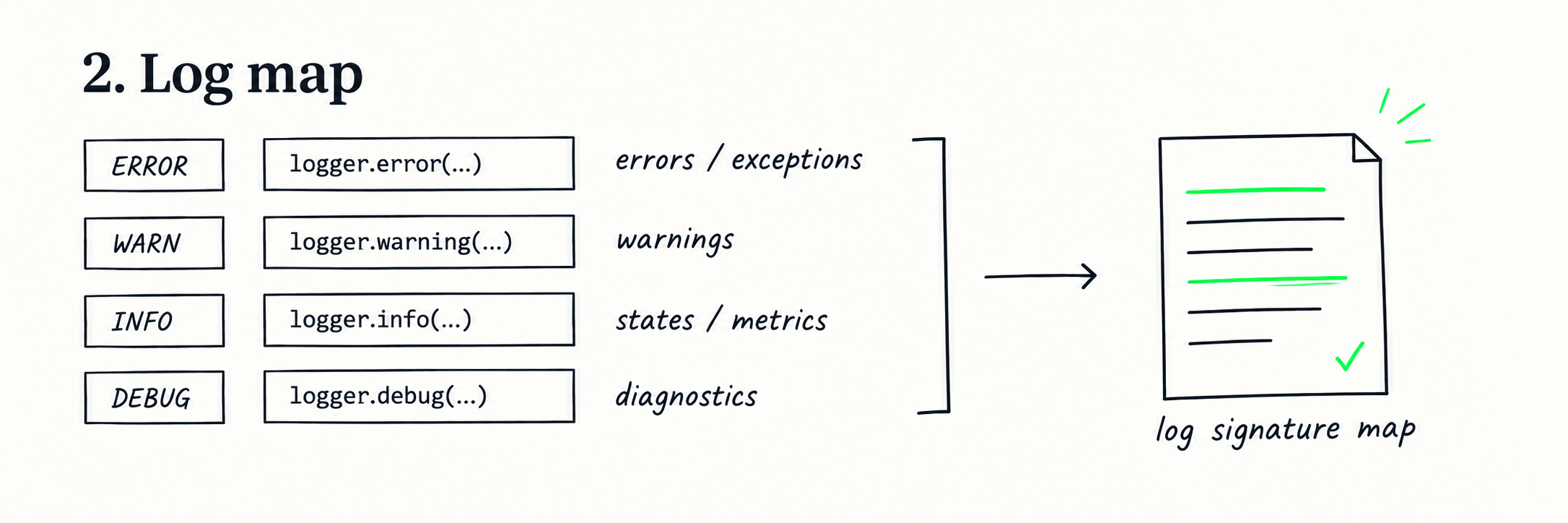
This makes it possible to systematically look for metrics, state transitions, and component startup and completion signals, as well as errors and warnings. Zero matches becomes a meaningful result in its own right. If a component has several logging signatures in the code but none appeared during the actual run, that deserves investigation: the component may not have started, may have dropped out of the execution path, or may be logging differently from what the code suggests.
What I like about this approach is how controlled it is. The agent does not improvise which lines matter: the project itself defines the search space. The check is reproducible, and the standalone version relies on ordinary shell tools rather than a particular agent platform. Compared with reading large continuous passages, it is also a relatively cheap first pass.
The output is a structured report, not just a list of matches. It shows which signatures were extracted from the code, how often they appeared in the log, which expected events were absent, and which components remained “silent.” For identified problems, the skill adds sample lines, a time range, a severity assessment, a hypothesis about the cause, potential impact, and a recommendation.
On a real OctoPrint log, this pass mapped 829 logger calls across 263 modules and showed which signals anticipated by the code actually appeared. See the full Log Validate report.
Still, Validate does not provide a full analysis of the log. It is good at checking whether the expected signals appeared, but remains limited to signatures already identified in the code. If a problem manifests as a sequence of individually normal events rather than one line, or has no recognizable signature at all, this analysis can easily miss it.
In other words, Validate is good at finding what we have already learned to look for.
Log Insight
Log Insight grew out of my distrust of analysis based on short excerpts.
I wanted the agent to see a continuous stretch of the system’s life — as large as the context window allowed — rather than a few lines around a match.
But a continuous passage without knowledge of the project is not particularly useful either. The orchestrator therefore first assembles a shared project context from documentation, business rules, workflows and configuration. It includes the architecture, happy path, expected error-handling paths, retries and fallbacks, invariants and numerical thresholds.
The briefing establishes a model of normal behavior. Without it, an agent can easily label a routine retry as an incident or, conversely, miss a violation of a business rule.
Project context is more than a technical introduction: it is a model of how the system should normally behave. A person, a model, or the two working together can define it, and that choice partly determines the subsequent analysis.
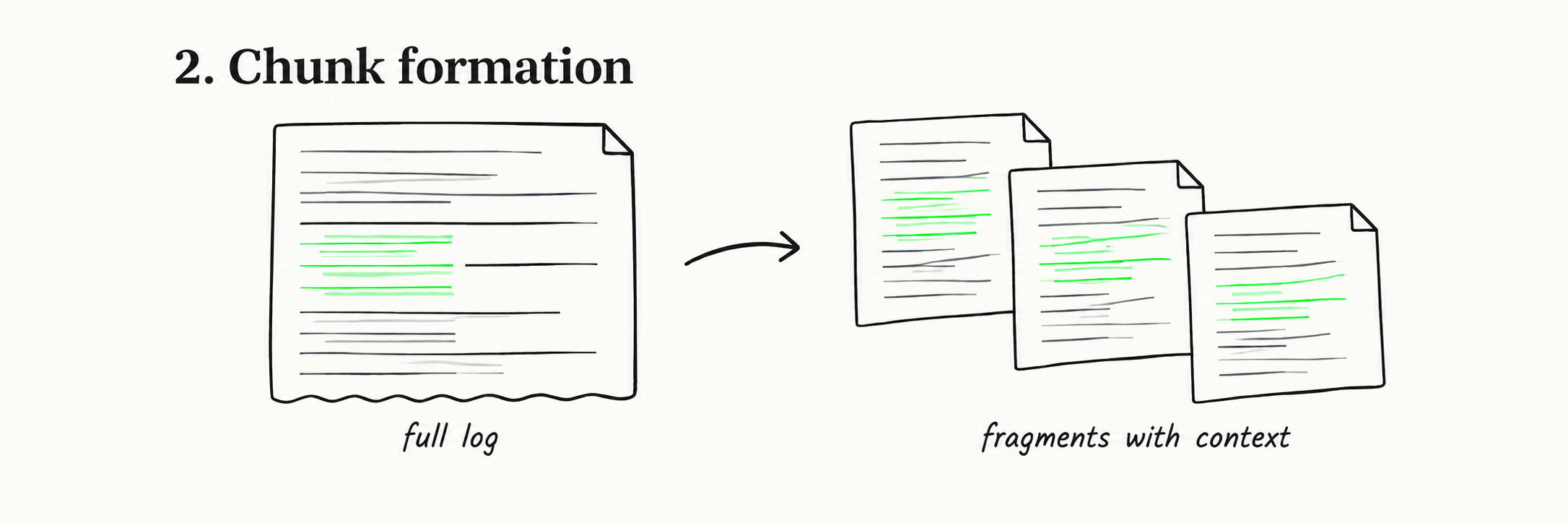
The log is then divided into N chronological chunks. Each subagent receives the full text of one chunk and the same project context. Not a grep extract, not the first and last lines, but the entire assigned passage. It must read the data first, and only then decide what matters.
The search is no longer built solely around individual matches. Subagents analyze sequences and causal chains: what happened before an error, whether recovery was attempted, whether the operation completed, how event frequency and metrics changed, whether components disappeared, and whether time gaps or other anomalies emerged.
After the parallel analysis, the orchestrator consolidates the reports, removes duplicates and compares signals across chunks. The result is not just a list of events, but a picture of their evolution: was the problem isolated, recurring steadily, gradually worsening, or appearing in bursts?
In the real OctoPrint example, Log Insight connected a recurring snapshot flood with subsequent thread exhaustion, memory errors and blocked printer reconnections. See the full Log Insight report.
This approach comes at a cost. It requires several subagents, consumes more tokens and depends heavily on the quality of the project context.
In Insight, the agent scaffolding is deliberately minimal: the orchestrator prepares a briefing and gives a subagent a continuous log passage. From there, the main contribution comes from the model itself — its ability to keep track of the sequence, notice weak connections and distinguish an anomaly from a normal execution branch.
Changing the model can therefore change not only the style of the report, but also which problems are found and how severe they are judged to be.
Example: one log, two reports
On the same OctoPrint log, the two skills produced different but compatible pictures.
Log Validate followed known signatures and revealed the scale of already visible problems: 69.4% of entries came from OctoEverywhere, and its main conclusion concerned network failures and plugin errors.
By comparing chronological chunks, Log Insight found another layer: recurring snapshot floods, followed by 46+ can't start new thread errors, MemoryError, and blocked printer reconnections.
Validate’s strength is a controlled, reproducible answer within a known signal space. Its weakness is that it may mistake the most frequent pattern for the main problem.
Insight is better at finding previously unknown connections, but depends more on the briefing, file coverage and chosen model. In that sense, choosing a model for Insight means choosing an interpretive lens: different models may reach different conclusions about which events are causally related and which are background noise.
Conclusion
Validate checks expectations. Insight reconstructs behavior.
I use them in exactly that order. First, Validate provides a quick, systematic pass over known signals, errors, coverage and “silent” components. If the cause is already clear, that can be enough.
If the answer depends on the sequence of events, contradictions remain, or we need to uncover connections we had not anticipated, I bring in Insight and give the agents continuous stretches of the log.
The skills will not create useful signals where a project barely logs anything, will not fix outdated documentation, and will not turn a model’s output into objective truth.
Their job is more modest: to make the analysis procedure more transparent — to show what was searched for, what was actually read, and where coverage ends.
My main takeaway from working on both skills is this: an agent does not analyze “the log” as such, but the representation of the log we gave it. Show a model only a grep extract, and it will reason about the grep extract — no matter how smart the agent is or how large its context window.